Key takeaways
- 3270 screen data preserves text and field attributes. An agent can use it without screenshots or visual targeting.
- Text and image inputs both scored 18/18 on six single-step tasks. Text was faster in our runs; end-to-end reliability remains untested.
- Field addressing depends on correct parsing and current screen state. Keyboard unlock and password masking each have limits the harness must handle.
A mainframe green screen gives an AI agent more to work with than its appearance suggests. Behind the display are text, field boundaries, and cursor positions that the agent can read directly.
IBM 3270 terminals already exchange this information with the host. The emulator turns it into a screen for a person. We built a TN3270 harness that passes the text and field information to a model, without screenshots or OCR.
Then we compared text and image inputs on six single-step tasks, with three repetitions per task. Both scored 18 out of 18. Text was faster in our runs. The tests covered reading a screen and choosing an action; they did not test a complete workflow.
Getting the live harness to work brought its own problems. A keyboard could unlock before the menu arrived. A password hidden on screen could still be present in the terminal buffer. Those details mattered as much as giving the model readable text.
The work follows our browser automation benchmark. Here, we looked at what an agent can use when the application sits behind a terminal.
1. Reading a 3270 screen
A 3270 terminal operates in block mode. The host writes character data and control orders into a terminal buffer, defining or updating the screen. On a formatted screen, field attributes mark boundaries and control where the operator can type. The terminal holds the buffer locally during input; submitting with ENTER or a program function key typically sends modified fields and the key identifier back to the host.
Fields can be protected or writable, numeric, intensified, or non-displaying. Protected fields contain labels and output. Writable fields accept input. Unformatted screens have no field boundaries, so they need a different input method.
The terminal also exposes keyboard state. After an attention key, input is normally locked until the host restores it. That gives the harness a useful readiness signal, but it does not prove that processing has finished or the expected screen has arrived. We check both keyboard state and screen content.
The useful property is that field boundaries survive transport. The harness can target an input using the host’s screen definition.
2. Choosing an interface
Before building visual automation, check what the application exposes. A supported API is usually the best starting point. Otherwise, use the available screen structure.
API. Use the application’s published operations and response contracts where they cover the task. Check the resulting state as well as the response status.
DOM and accessibility tree. Browser elements expose identities, roles, and values. Our browser automation node uses this structure to act on elements and check the result.
Terminal protocol. TN3270 carries the terminal’s character data and field attributes. A harness can derive input addresses from that data. This serves a similar purpose to browser structure on a different kind of application; it is not inherently a lower tier.
Pixels. Screenshots and visual targeting remain useful when the available connection exposes no usable structure. A Citrix session may impose that constraint, depending on which interfaces the deployment permits you to reach.
| Interface | Action target | Result to check |
|---|---|---|
| API | Published operation | Response and resulting record |
| DOM / accessibility | Element identity or role | Expected element state and values |
| Terminal protocol | Field or buffer position | Expected panel and record values |
| Pixels | Visually located control | Visible result, plus an independent check where available |
3. What we built
The harness exposes five actions to the agent:
fill_field(field_index, value)
  -> write into a field the host declared writable, addressed by index
     formatted screens only

type_text(value, row, col)
  -> type at a position, or at the cursor if row/col are omitted
     the only way to enter anything on an unformatted screen

press_key(key)
  -> ENTER, CLEAR, PF1..PF24, PA1..PA3
     send an attention key; check keyboard state and the resulting screen

wait(seconds)
  -> wait for keyboard unlock; this alone does not confirm the expected screen

done(summary, extracted)
  -> the task is complete, with whatever was asked for
The agent receives the screen after every step as a character grid and field list. It does not need a separate read action. Scripted callers can use read_screen on the HTTP interface.
fill_field works on formatted panels. Our TSO logon screen is unformatted, so login needs type_text, which writes at the cursor or a specified row and column. These are terminal positions, not coordinates inferred from an image.
The harness drives s3270, the scripting engine from the x3270 suite, directly. We needed asynchronous session handling, field attributes, and keyboard state in the same adapter. A synchronous wrapper would need extra handling to avoid blocking other sessions during a read.
The host is Hercules, running MVS 3.8j under TK4-, version 1.00 update 08, MVS PUT 8505. We loaded the ledger fixture through the emulator’s card reader using JCL. The data lives in a dataset on an emulated volume, so the harness exercises the host’s normal storage and terminal paths.
The harness and screen-fingerprinting code are not published. The examples below show their inputs and behavior.
The model interprets abbreviated labels and selects actions. The harness parses the screen and executes those actions. Keeping those responsibilities separate lets us test field addressing independently of model behavior.
4. What the agent actually sees
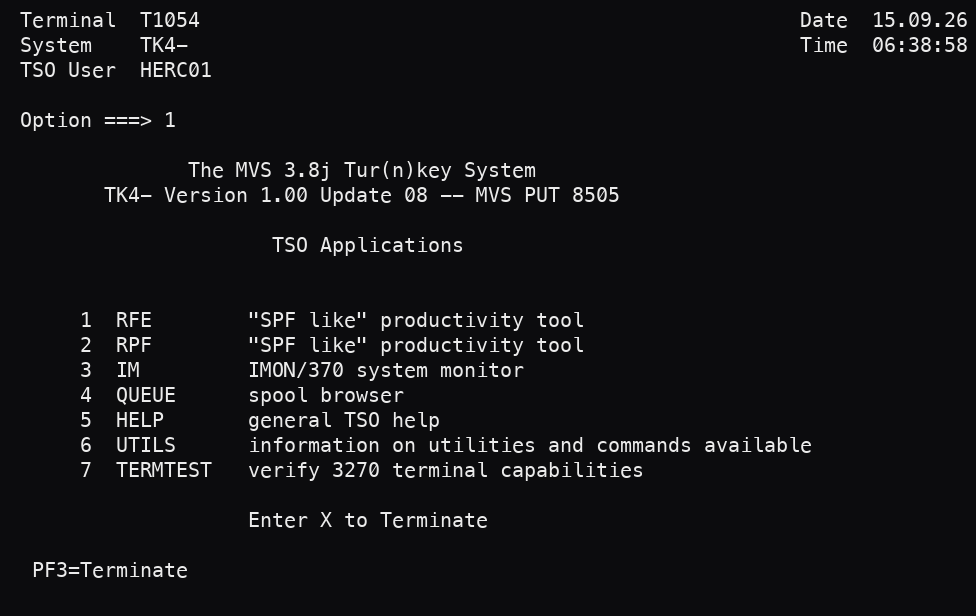
The menu below comes from the fixture host. The image shows what an operator sees; the text block shows what enters the model’s context.
     12345678901234567890123456789012345678901234567890123456789012345678901234567890
  1   Terminal  T1054                                                  Date  15.09.26
  2   System    TK4-                                                   Time  06:38:58
  3   TSO User  HERC01
  4
  5   Option ===> 1
  6
  7                 The MVS 3.8j Tur(n)key System
  8          TK4- Version 1.00 Update 08 -- MVS PUT 8505
  9
 10                        TSO Applications
 11
 12
 13        1  RFE        "SPF like" productivity tool
 14        2  RPF        "SPF like" productivity tool
 15        3  IM         IMON/370 system monitor
 16        4  QUEUE      spool browser
 17        5  HELP       general TSO help
 18        6  UTILS      information on utilities and commands available
 19        7  TERMTEST   verify 3270 terminal capabilities
 20
 21                      Enter X to Terminate
 22
 23    PF3=Terminate
 24
FIELDS: 133 total, 1 writable
#21 @r5c14 len=1 : '1'
CURSOR: r5c14 KEYBOARD: unlocked FORMATTEDThis panel has 133 fields and only one writable input. The field list saves the model from having to infer which text can be edited.
Asked to open RFE from this menu, the agent returned:
{"action": "press_key", "key": "ENTER",
 "reason": "Option field already contains 1 (RFE), so submitting selects it."}
We expected it to write 1 into field #21 and press ENTER. It noticed that the field already contained 1 and skipped the write. Our first checker rejected this valid action because it required the sequence we had anticipated. We corrected the scoring rule.
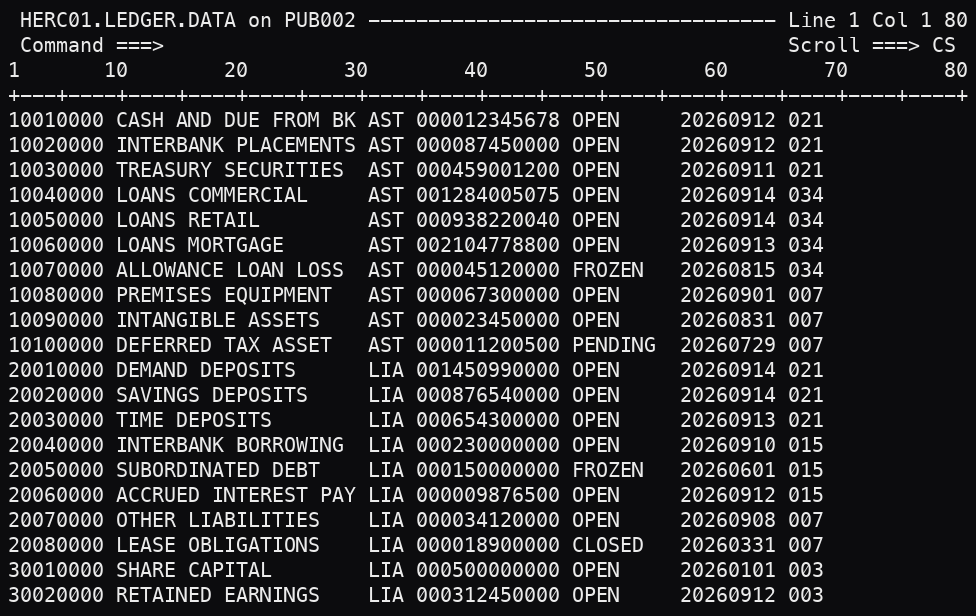
After navigating into RFE and browsing the dataset, the ledger screen looks like this. The text excerpt omits the lower rows.
     12345678901234567890123456789012345678901234567890123456789012345678901234567890
  1   HERC01.LEDGER.DATA on PUB002 ---------------------------------- Line 1 Col 1 80
  2   Command ===>                                                    Scroll ===> CS
  3  1       10        20        30        40        50        60        70        80
  4  +---+----+----+----+----+----+----+----+----+----+----+----+----+----+----+----+
  5  10010000 CASH AND DUE FROM BK AST 000012345678 OPEN     20260912 021
  6  10020000 INTERBANK PLACEMENTS AST 000087450000 OPEN     20260912 021
  7  10030000 TREASURY SECURITIES  AST 000459001200 OPEN     20260911 021
  8  10040000 LOANS COMMERCIAL     AST 001284005075 OPEN     20260914 034
  9  10050000 LOANS RETAIL         AST 000938220040 OPEN     20260914 034
 10  10060000 LOANS MORTGAGE       AST 002104778800 OPEN     20260913 034
 11  10070000 ALLOWANCE LOAN LOSS  AST 000045120000 FROZEN   20260815 034
 12  10080000 PREMISES EQUIPMENT   AST 000067300000 OPEN     20260901 007
 13  10090000 INTANGIBLE ASSETS    AST 000023450000 OPEN     20260831 007
 14  10100000 DEFERRED TAX ASSET   AST 000011200500 PENDING  20260729 007
 15  20010000 DEMAND DEPOSITS      LIA 001450990000 OPEN     20260914 021
 16  20020000 SAVINGS DEPOSITS     LIA 000876540000 OPEN     20260914 021
 ...
FIELDS: 5 total, 2 writable
#2 @r2c15 len=50 (the command line)
#4 @r2c78 len=2 (the scroll amount)
CURSOR: r12c44 KEYBOARD: unlocked FORMATTEDAsked “What is the status of ledger account 1007 0000?”, the agent answers from the grid:
{"action": "done", "summary": "Ledger account 10070000 ALLOWANCE LOAN LOSS has status FROZEN",
 "extracted": {"status": "FROZEN"}}
The ledger records are protected output. The two writable fields are the command line and scroll amount. Fixed columns preserve the record layout without OCR, though the model can still select the wrong row or misinterpret a value.
Field addressing removes visual aiming errors. It still depends on a correct parser and a current screen definition, and the model can choose the wrong field.
Passwords need separate handling. On formatted panels, a non-display attribute hides a field’s contents from view. It does not remove them from the terminal buffer. Our harness filters those values from the screen observations it gives the model. IBM’s data-stream documentation describes this distinction.
Our fixture’s TSO login uses an unformatted screen, so field-based filtering does not apply. In this implementation, the credential reaches the model and is redacted from step history, summaries, reasons, and logs before they are stored. That redaction does not undo model exposure. A login tool that injects credentials outside model context would avoid that exposure.
5. Knowing which screen you are on
Keyboard unlock is useful, but some applications unlock before processing finishes. The x3270 scripting documentation warns about this explicitly. Unlock alone is not a completion check.
Our fixture showed another problem. TSO login displays a broadcast screen, a welcome banner, and a fortune before the menu. The keyboard unlocks between them, and some wait for ENTER. Treating the first unlock as arrival at the menu sends the next command into a banner.
We wait for an expected screen fingerprint: application text at a known position. On this fixture, TSO Applications identifies the menu and REVIEW FRONT END identifies RFE. Keyboard state tells us whether input is available; the fingerprint tells us where we are. Sending ENTER also requires recognizing a prompt that expects it. An unlocked, unchanged screen is not enough.
Labels can help locate fields when a panel moves. For example, finding the writable field after Option ===> is less dependent on an absolute row number. It still needs validation after a panel change: labels, field order, and layout can all change.
A possible next step is to record observed screens, their fingerprints, fields, and transitions in a navigation map. After review, a runner could replay known paths without a model call at each step and request help when a screen fails its checks. One traversal only captures one path; branches, permissions, and error screens need separate coverage.
We have implemented fingerprinting. The map generator and replay compiler are proposed work.
For a write workflow, screen recognition is only part of verification. A confirmation message should be followed by an inquiry that checks the saved value. This extends the rule from our browser benchmark: score the observed result independently of the agent’s summary.
Review also has to resolve application-specific meanings. Labels such as CCTR and values such as AST and LIA need definitions from someone who knows the system. Those definitions belong in the reviewed map and need maintenance as the application changes.
6. What we measured
We evaluated one model on six tasks using two captured screens from the fixture host. Each task had three repetitions. These were single-step reading and action-selection tests, not runs through login, navigation, and a completed transaction.
The tasks covered one menu action, four ledger-cell lookups, and one aggregate over the grid. Expected ledger values came from the JCL deck used to load the fixture. The model was Claude Opus 5 (claude-opus-5).
| Task | What it tests | Correct | Text p50 latency |
|---|---|---|---|
| menu-select | action selection on a formatted panel | 3/3 | 2.75s |
| balance-lookup | numeric cell, 12 digits | 3/3 | 3.04s |
| status-lookup | cross-column lookup | 3/3 | 2.38s |
| costcentre-lookup | rightmost column, near the row end | 3/3 | 3.36s |
| date-lookup | adjacent columns | 3/3 | 2.61s |
| status-count | aggregate over the whole grid | 3/3 | 4.26s |
All 18 text-input trials were correct. Median latency by task ranged from 2.38 to 4.26 seconds; the slowest observed response took 4.72 seconds. Each trial used one model call. Latency was measured at the client on one network path.
We also supplied the same screens as PNGs. Both representations scored 18/18 in the final run. Text was faster on every task in both runs we recorded. This small sample does not establish an accuracy advantage, production reliability, or the reliability of field writes.
The result we did not expect
On a separate customer-account fixture containing names, account numbers, and balances, the model refused extraction requests. Supplying the same screen as an image also produced a refusal.
When we switched to a general ledger fixture with institutional records and no named individuals, the refusals stopped. This let us measure screen reading, but it also changed the evaluation’s scope.
These observations apply to the model and configuration we tested. They do not establish how other models or integrations would behave. A pilot involving customer data should test the intended tasks and authorization context before relying on extraction.
7. Where this could help
The menu example shows the immediate benefit. The harness knows where the writable field is because the host defines it. The model still has to choose the right action, but the harness can place the input without locating a control in an image. That depends on parsing the screen correctly and using its current field definitions.
Text also gives us something convenient to inspect. We can keep a value alongside the screen and position it came from, then search or compare those observations when reviewing a run. Sensitive values still need filtering before they enter the record.
Replaying familiar paths is the next possibility. Once a path has been recorded and reviewed, a runner could handle its routine steps without asking the model what to do each time. We have not built that runner yet. It could reduce repeated model calls, but we would need to measure the savings alongside the work of reviewing and maintaining the paths.
A payment investigation, for example
Consider a hypothetical bank where an investigator uses a terminal to trace payments and has no supported API for the lookup. A customer says a transfer never arrived. The investigator signs in, finds the posting by reference, and reads its value date, amount, status, and cost centre. They copy those details into the case system and draft a reply.
A reviewed replay path could take care of the navigation. At the relevant screen, the agent would read the posting from the character grid, using the row and column layout to find its values. It would still have to select the right record and interpret it correctly. In our ledger fixture, those values are part of the displayed text; they are not individually addressable input fields.
The proposed workflow would copy the values into the case record with their source screen and positions attached. The investigator could check them before approving the reply. The ledger lookup would remain read-only.
We have not tested this workflow or measured how much time it would save. There is also an unresolved problem from our experiment: the model refused extraction from a separate fixture containing names and account numbers. A payment investigation could encounter the same issue, so a pilot would need to test the actual customer-data tasks and their authorization context.
8. Before a production pilot
Start with a bounded read-only task. A lookup or extraction gives you a way to test navigation, permissions, and interpretation against known answers. Include the screens users actually encounter: expired sessions, permission errors, empty results, and prompts between panels.
Keep writes behind explicit checks. A writable field is a terminal property, not permission to change a business record. A write path needs reviewed actions, appropriate authorization, and a check of the saved result. The single-step tests here do not qualify such a path for production.
Plan for host integration work. Getting to the screen took work too. A dataset security product rejected jobs with a four-character message. A catalog volume refused user allocation. TSO sessions held onto a userid until an operator cancelled them. Each of these had to be resolved before the agent could do anything useful.
The next test should follow a task from login to a checked result, with expired sessions, unexpected screens, and other failures introduced along the way. We have shown that the model can read these captured screens and choose a next action from text. Now we need to find out how well the whole system holds up across a complete task.
Glossary
A few terms from the mainframe and agent tooling used in this article.
The platform
| Term | What it means here |
|---|---|
| 3270 | IBM’s terminal family and the data format it speaks. A 3270 screen is a fixed grid of rows and columns, and the host sends text plus per-field metadata, never an image. |
| Green screen | Everyday name for a 3270 terminal session, after the original monochrome displays. Still the primary interface for a lot of core banking, insurance and logistics systems. |
| TN3270 | A Telnet-based protocol carrying 3270 data streams over TCP/IP. |
| MVS / z/OS | IBM’s mainframe operating system. MVS is the older name; z/OS is the current one. Our fixture runs MVS 3.8j, a public-domain version from 1981. |
| TSO | Time Sharing Option: the interactive login and command environment on MVS and z/OS. It is where a user lands after signing in, before choosing an application. |
| CICS | IBM’s transaction processing system, used by many interactive mainframe applications. |
| JCL | Job Control Language: the batch job format used to tell the system what to run and with which data. We loaded the ledger fixture with a JCL deck. |
| Dataset | The mainframe term for a file. Our fixture data lives in a dataset on an emulated disk volume. |
| Hercules / TK4- | Hercules emulates mainframe hardware on ordinary machines. TK4- is a packaged MVS 3.8j distribution that runs on it. Together they gave us a real host to drive without a real mainframe. |
| RFE | Review Front End, the browse application in our fixture. It is the panel the ledger extract is read through. |
| x3270 | A long-standing open-source 3270 terminal emulator with a scripting interface. Its documentation is the source for the keyboard-lock caveat above. |
The screen
| Term | What it means here |
|---|---|
| Formatted / unformatted | A screen with field boundaries, or one without them. The menu and browse panels here are formatted; the fixture’s TSO login is unformatted. |
| Field attribute | Per-field metadata in the 3270 stream: protected/unprotected, numeric-only, intensified, hidden. |
| Protected / unprotected | Whether the host will accept typing into a field. Unprotected means writable at the terminal. It does not mean you are authorized to change the business record behind it. |
| Intensified | A field the host marks for emphasis, brighter than the rest. Applications often use it for errors and headings, so it is a useful signal and not decoration. |
| Hidden field | A non-displaying field. Its contents remain in the terminal buffer and need filtering before model input or logging. |
| PF key | Program function key (PF1 to PF24). The 3270 equivalent of a submit action, interpreted by the host application. |
| Attention key / PA key | The keys that hand control back to the host: ENTER, CLEAR, the PF keys, and PA1 to PA3. Nothing you type reaches the host until one of them is pressed. |
| Keyboard lock | Input inhibition reported by the terminal. Unlock permits input but does not prove that processing is complete. |
| Screen fingerprint | Expected application text at known positions, used to recognize a screen. |
What agents use elsewhere
| Term | What it means here |
|---|---|
| DOM | Document Object Model: the browser’s structured representation of a web page, where every element has an identity, a role and a value. It is what a browser agent reads instead of pixels. |
| Accessibility tree | The view of a page that screen readers use, derived from the DOM and describing what each element is and does. A 3270 field attribute is the closest mainframe equivalent. |
| OCR | Optical character recognition: recovering text from an image. The point of this article is that on 3270 there is nothing to recover, because the text never became an image. |
How we tested
| Term | What it means here |
|---|---|
| Harness | The code we wrote around the terminal session: it connects, parses screens, exposes the five actions to the model, and enforces the checks. |
| Fixture | A controlled test system with known contents, so an answer can be graded against the truth. Ours is a general ledger loaded from a JCL deck. |
| p50 latency | The median: half the runs were faster, half slower. Reported per task, measured at the client on one network path. |
| Navigation map | Proposed: a reviewed record of observed screens, fields, and transitions. |
| Runbook | Proposed: a replayable path through a reviewed map, with checks that stop execution when expectations fail. |